
 80813-00200
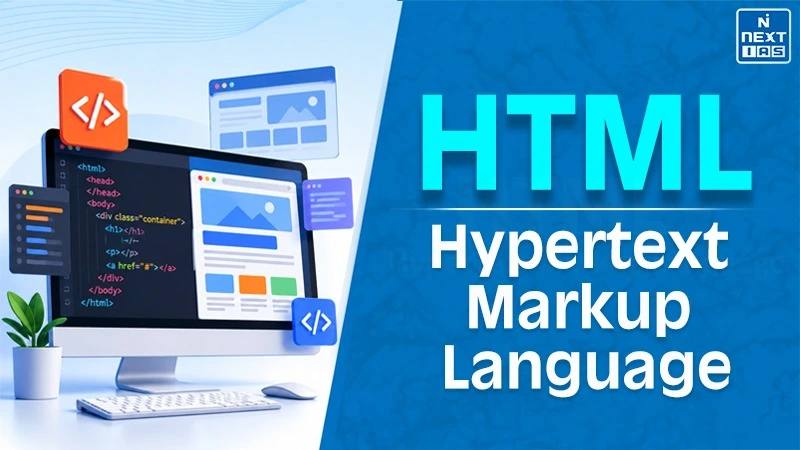
HTML (HyperText Markup Language) is the foundation of the World Wide Web. It is a markup language used in programming that provides the basic framework for millions of websites and software. It was invented in 1990 by Tim Berners-Lee. It has played an integral part in the formation of the internet.
HTML structuring mainly basis on tags to categorise text, graphics, links, tables, forms, and multimedia content. HTML5 includes elements such as <header>, <nav> and <footer>. HTML is not a programming language but uses CSS and JavaScript for functionality and styling.
HTML Introduction, Meaning and History
HTML stands for HyperText Markup Language. This is the most widely used markup language used in developing web pages. It enables browsers to render data on a website using this language tags to structure data elements with examples like headings, paragraphs, images, hypertext links, and multimedia. HTML can be combined with other languages such as CSS and JavaScript. The 1st version of HTML was HTML 2.0 in 1995, then HTML 3.2 in 1997, followed by HTML 4.01 in 1999. HTML5 came out in 2014 and XHTML added XML syntax requirements to HTML.
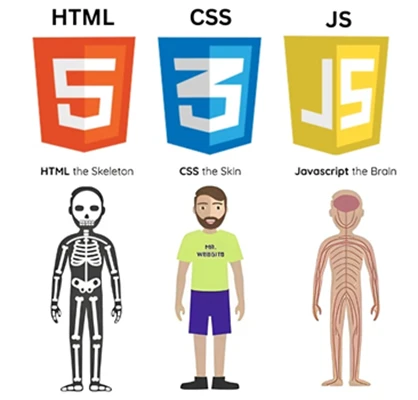
Difference Between HTML, CSS and JavaScript
| Basis | HTML | CSS | JavaScript |
|---|---|---|---|
| Full form | HyperText Markup Language | Cascading Style Sheets | JavaScript |
| Main role | Structures content | Styles content | Adds behaviour and interactivity |
| Example | Headings and paragraphs | Colours and layouts | Interactive menus and validation |
| Type | Markup language | Style sheet language | Programming language |
Structure of Hypertext Markup Language
HTML documents have a typical structure that allows the web browser to understand and present a web page. The basic elements of HTML documents are the <!DOCTYPE html>, <html>, <head>, <title>, and <body> tags.
- <!DOCTYPE html>: It declares that the document is in HTML5 and helps the browser to render the document in standards mode.
- <html> Tag: This is the root tag that includes all the content of the HTML document. The lang attribute allows defining the language of the page.
- <head> Tag: The head tag holds the metadata, character set, settings for the page, style sheets, etc.
- <title> Tag: It specifies the title of the page shown in the browser tab.
- <body> Tag: Holds visible content of the page such as headings, paragraphs, images, links, and lists.
Features of HTML Script
HTML stands for HyperText Markup Language, which possesses certain features which make it necessary for building and organising web pages.
- Easy to Use and Learn: HTML employs easy-to-use tags and has an uncomplicated structure.
- Platform Independent: Documents written in HTML can be run on various platforms with the help of compatible web browsers.
- Hyperlinking and Multimedia Support: HTML provides the facility of hyperlinks among web pages and multimedia support, including graphics, sound and videos.
- Content Structuring: HTML uses headings, paragraphs, lists and tables among other structures for structuring data.
- CSS and JavaScript Integration: CSS helps in enhancing the presentation and layout of pages whereas JavaScript helps in adding interaction to web pages.
- Semantic Elements: The semantic tags like <header>, <nav>, <main> and <footer> define the role of the content present on the web page.
- Form Elements: The form elements such as <input>, <textarea> and <button> help in acquiring user input and receiving feedback from users.
Applications of Hypertext Markup Language
HTML is extensively applied in web programming for organising content as well as creating digital experiences that can be read by browsers. Major applications of HTML include:
- Website Development: The fundamental building blocks of a website comprise elements that make use of headings, paragraphs, navigation menu, images and hyperlinks.
- Content Organisation: In the context of organising digital content such as blogs, articles and other written text, HTML uses headings, paragraphs, lists and hyperlinks.
- Form Construction: Through input fields, checkbox, buttons and other elements, HTML form collects and submits user information.
- Incorporating Multimedia Elements: HTML offers elements such as <img>, <audio>, <video> etc. for the purpose of embedding multimedia elements in a webpage.
- Web Application Interface Building: HTML structures interface of applications, such as ecommerce application, dashboards etc. along with CSS and JavaScript.
- Email Template: HTML templates are created for newsletters, advertisements and other transactional emails.
HTML Future Scope and Significance
- HTML Standards in Browsers: The use of HTML, web pages become consistent on various browsers. Thus facilitating the task of web developers.
- Accessibility-Oriented Webpage Designing: Semantic tags, such as <header>, <nav>, <main>, and <footer> tags make websites more easily readable by assistive tools.
- Other Contemporary Web Technologies: HTML is compatible with CSS, JavaScript, and other tools that allow the creation of responsive and interactive websites.
- Relevance of Learning HTML: HTML offers students the opportunity to learn the basics of web development. Learning elements and structures in HTML will make the process of mastering other aspects of frontend development, website designing, and application development easier.
FAQs about HTML
What is the expanded form of HTML?
The expanded form of HTML is Hypertext Markup Language. This is the most commonly used markup language for structuring web content.
Who invented HTML?
HTML was invented by Tim Berners-Lee somewhere around 1990 at the time of invention of the World Wide Web.
What are the basic tags in HTML?
Some common HTML tags are <html>, <head>, <title>, <body>, <h1>, <p>, <a> and <img>.
What is the difference between HTML, CSS and JavaScript?
While HTML is used for structuring the web content, CSS is used for styling them and JavaScript is used for adding functionality.
What is the current version of HTML?
HTML is maintained as a Living Standard and not a versioned one.
